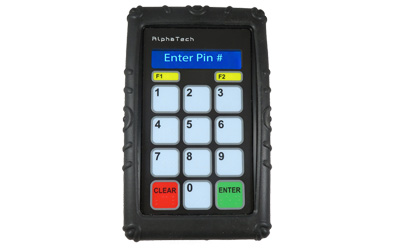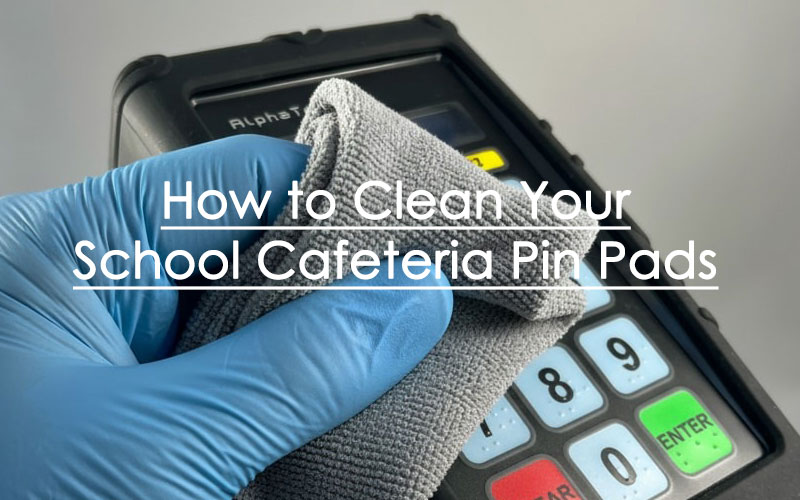
The need to clean pin pads properly has become crucial at the time of increased health awareness. This isn’t just good practice—it’s vital to public health. Your students and staff notice and appreciate visible cleaning practices. Regular sanitization of these high-touch surfaces helps prevent germs and viruses from spreading. On top of that, it extends your devices’ life span.
We’ll show you the step-by-step process to clean your payment terminals safely in this piece. You’ll learn the right cleaning methods that kill germs without damaging these sensitive electronic devices.
Why Cleaning School Cafeteria Pin Pads Matters
Pin pad devices serve as major germ transmission spots in retail stores. Clean devices do more than look good—they stop contagious diseases from spreading between customers and staff. Every transaction adds dirt and grime that can house harmful microorganisms.
A clean environment shapes your student’s perception. They notice visible cleaning efforts that show you care about their health, which matters more during health crises.
Clean pin pads protect your cafeteria’s investment. Dirt buildup on electronic equipment reduces disinfectant effectiveness. Regular cleaning helps extend your school technology’s lifespan.
Most school nutrition districts now follow cleaning protocols due to increased awareness about contaminated touchpoints. Notwithstanding that, wrong cleaning methods can harm sensitive electronics, so you need the right approach to balance sanitation with device durability.
How to Clean a School Lunch Pin Pad Safely: Step-by-Step
A clean payment terminal needs careful attention. Here’s a reliable way to clean pin pad devices safely:
- Check your manual before you begin.
- Power down completely – The device needs to be turned off and unplugged from its power source. This significant step prevents electrical damage and potential shocks.
- Prepare cleaning materials – A clean microfiber cloth with a light water dampening works best. Stubborn dirt needs one or two drops of pH-neutral, non-abrasive soap.
- Clean gently – The exterior surfaces need careful wiping, especially the buttons and sides where contact occurs. Liquid should never be sprayed directly onto the device because it can seep into openings and cause permanent damage.
- Sanitize properly – A microfiber cloth with 70-90% isopropyl alcohol works best for disinfection after cleaning. The application should be gentle without vigorous scrubbing.
- Ensure complete drying – All surfaces must be completely dry before reconnection.
- Reconnect and power on – The device can be plugged in and turned on once it’s dry.
Note that harsh chemicals like bleach, hydrogen peroxide, thinners, or ketone-based solvents will damage the device’s plastic and rubber components.
Extra Tools and Tips for Better Cleaning
Your devices need another layer of defense through protective accessories. Our complementary PIN pad covers should also be cleaned and since they are made of resistant rubber, wipes or sanitizer can be used in this case.
Cleaning frequency matters by a lot. High-traffic cafeterias should clean devices after lunch, dinner and breakfast with alcohol wipes. Don’t reuse the same cloth all day since it could harbor viruses. Deep cleaning should happen regularly while devices are powered off.
Conclusion
Clean pin pad devices are essential for any school cafeteria. In this piece, we’ve explored why regular sanitization matters for both public health and student confidence. Clean payment terminals not only prevent germs from spreading but also protect your technology investment. K12 students certainly notice and appreciate that their school tprioritizes cleanliness, especially with frequently touched surfaces.
The proper cleaning technique matters just as much as frequency. You should power down your devices first, use appropriate cleaning materials, and let them dry completely before reconnection. So you’ll avoid damaging sensitive electronics while achieving full disinfection. Of course, you should avoid harsh chemicals since they damage components and might void warranties.
Clean school cafeteria POS terminals showcase your values and attention to detail. Make pin pad maintenance a standard part of your daily operations. The right approach helps you protect both student health and payment technology, which creates benefits for everyone who walks through your doors.
FAQs
Q1. How often should I clean my pin pad device? For high-traffic cafeterias, it’s recommended to clean the device between breakfast, lunch and dinner using alcohol wipes. Additionally, schedule regular deep cleaning sessions when the devices are completely powered off.
Q2. What’s the best way to clean a pin pad without damaging it? First, power off and unplug the device. Use a clean microfiber cloth slightly dampened with water and, if needed, a drop of pH-neutral soap. Gently wipe the exterior surfaces, paying special attention to buttons and sides. Then, sanitize with a cloth dampened with 70-90% isopropyl alcohol. Ensure the device is completely dry before reconnecting.
Q3. Can I use rubbing alcohol to clean my pin pad? Yes, you can use 70-90% isopropyl alcohol to sanitize your pin pad. Apply it gently using a microfiber cloth, but avoid scrubbing vigorously. Never spray alcohol directly onto the device as it can seep into openings and cause damage.
Q4. Are there any cleaning products I should avoid using on pin pads? Avoid using harsh chemicals like bleach, hydrogen peroxide, thinners, or ketone-based solvents. These can deteriorate plastic and rubber components of the device. Also, never spray liquids directly onto the pin pad as this can cause permanent damage.
Q5. How can I protect my pin pad device between cleanings? Consider using protective accessories like our complementary PIN pad covers. These make sanitizing between transactions easier and protect the equipment from accidents.
AlphaTechs USA offers a wide selection of innovative solutions designed to improve school lunch experience and make lunch lines go faster including stand-alone pin pads and pin pad scanner combos such as 1D scanners and 1D/2D QR barcode scanners as well as RFID code readers. Each unit comes with a free complementary anti-shock cover designed to keep your devices safe at all time.
Orbital scanners, USB handheld barcode scanners and Bluetooth handheld barcode scanners are also available.
For any school cafeteria pin pad related question, feel free to contact us.