Modern cafeteria POS systems are changing how dining facilities serve their customers. These systems help cafeteria workers serve more customers quickly and substantially reduce operational costs. Lunch lines move much faster, which makes a real difference whether you manage a busy school lunchroom or oversee a hospital dining facility. The right point-of-sale technology can boost your operation’s efficiency.
A POS system in restaurants and cafeterias does more than replace traditional cash registers. School cafeteria POS systems make payments safer and reduce errors. Each facility type gets specialized features – hospitals have location-specific optimizations, while college dining halls get flexible options for campus environments. The systems provide up-to-the-minute inventory tracking that cuts waste and boosts profits.
This piece shows how the right cafeteria POS solution leads to greater savings for schools, districts, and taxpayers. Customer feedback features help cafeteria teams improve dining experiences continuously. You’ll learn which features matter most when picking a system that could cut operating costs by up to 40% in 2026 and beyond.
What Is a Cafeteria POS System and How Does It Work?
A cafeteria POS system combines specialized hardware and software to manage transactions and simplify operations in institutional food service environments. These platforms serve the unique needs of high-volume, quick-service dining facilities in schools, hospitals, and universities, making them different from typical restaurant systems.
POS vs Traditional Cash Registers
Traditional cash registers and modern POS systems have fundamental differences in their capabilities and scope:
- Traditional Cash Registers:
- Process simple sales transactions and store cash
- Provide simple end-of-day reports with total sales
- Need manual inventory tracking and reconciliation
- Accept limited payment options (typically cash only)
- Work as standalone units without integration capabilities
- Cafeteria POS Systems:
- Handle various payment methods including meal plans, account balances, and mobile payments
- Create complete analytics on sales, inventory, and customer priorities
- Track and manage inventory automatically
- Merge with other institutional systems
- Support multiple service points and locations from a central platform
The move from traditional cash registers to POS systems means more than just upgrading technology. Many cafeterias now have better order accuracy, faster transactions, and lower operational costs.
Core Functions in a Cafeteria Setting
Institutional cafeterias rely on POS systems for several key features:
These systems enable simplified transaction processing through quick-service interfaces that cut down wait times in lunch lines. This speed helps during busy periods when cafeterias serve hundreds of customers quickly.
The software provides precise tracking of transactions, inventory, and account balances. This accuracy helps maintain detailed records and reduces errors common in manual processes.
Cafeteria POS platforms include strong security features that minimize risks in cash handling. Account-based and cashless transactions protect financial assets and personal information effectively.
The integrated reporting and analytics help managers learn about cafeteria operations. They can monitor expenses, track sales patterns, and analyze financial performance easily.
Integration with Meal Plans and Rewards
The most unique feature of cafeteria POS systems is how they work with institutional meal plans and payment systems. These platforms connect with student and employee databases to enable:
- Account-based transactions: Users pay through pre-loaded accounts, meal credits, or points instead of cash
- Flexible meal plan management: Support for various formats like points-based, dollar-based, prepaid, or unlimited options
- Automatic eligibility verification: Quick checks for subsidized meals or special pricing qualification
- Multi-location accessibility: Account balances and meal plans work at different dining locations across campus
These systems help cafeterias create loyalty programs, keep track of what people buy, and offer tailored promotions based on dining habits.
POS systems transform institutional dining from simple transactions into sophisticated operational management through these features.
How Cafeteria POS Systems Cut Operating Costs by 40%
Modern cafeteria POS systems do much more than just process transactions. The numbers show that well-implemented systems can cut operating costs by up to 40% in many areas. These savings actually make service better, not worse.
Labor Efficiency and Self-Service Kiosks
Self-service kiosks have changed how cafeterias work by reshaping staff roles. Food service operations now run with 10-15% fewer staff compared to pre-2020 levels. POS technology and self-service options cut labor hours by 20-30%.
Staff aren’t being eliminated – they’re being used more effectively. When kiosks handle orders and payments, employees can focus on:
- Food preparation and quality control
- Dining area cleanliness and maintenance
- Providing customized help to customers with special needs
Self-checkout kiosks make transactions 30-50% faster, and a single employee can watch multiple service points at once. This works especially well in school cafeterias, where one staff member can oversee several kiosks during busy lunch hours.
College cafeteria systems take this a step further. They can optimize schedules based on past traffic patterns. The system spots peak customer times, which helps managers adjust staffing and avoid having too many workers during slow periods.
Inventory Waste Reduction
Inventory management offers another way to save money. Restaurants typically waste 4-10% of their food purchases, which hurts their bottom line. Hospital cafeteria POS systems help curb this problem with immediate inventory tracking for each ingredient.
Good POS inventory management gets results:
- Reduces stockouts by about 15%
- Cuts excess inventory by around 10%
- Minimizes food waste by tracking expiration dates
These systems create detailed reports that help cafeteria managers spot slow-moving items and adjust their purchases. The void audit report shows canceled transactions that often lead to food waste, giving useful insights to reduce unnecessary food prep.
Faster Checkout and Higher Throughput
Quick service affects both customer happiness and how many people you can serve. University cafeteria POS systems handle different payment types fast, including meal plans, declining balance accounts, and mobile payments.
This speed brings clear benefits:
- Shorter lines during rush hours
- More customers served
- Higher transaction numbers
- Happier customers
Processing multiple orders at once eliminates the bottlenecks you get with traditional single-file lines. Research shows 70% of customers prefer self-ordering technology over cashiers because they can customize orders at their own pace.
Reduced Cash Handling and Errors
Handling cash creates many problems like counting mistakes, security risks, and time-consuming reconciliation. Modern cafeteria POS systems solve these issues by supporting cashless payments through RFID cards, mobile wallets, and stored value accounts.
Cashless cafeterias have fewer payment errors and less shrinkage. Digital ordering also prevents miscommunication between customers and staff, which reduces food waste from wrong orders. Better order accuracy means kitchens make exactly what customers want—cutting down on costly mistakes and remakes.
School districts that use cafeteria POS systems spend less time counting cash and get better financial accuracy. Automated tracking eliminates common math errors while creating complete audit trails for administrative oversight.
Top Features to Look for in 2026 Cafeteria POS Systems
Modern cafeteria POS systems come with sophisticated features that solve specific operational challenges. Food service operations need to identify which features provide the most value to make smart investment decisions that match their long-term goals.
Real-Time Inventory Management
Modern cafeteria POS systems consider inventory control their life-blood feature. Advanced platforms cut stock levels immediately as orders come in, which eliminates manual tracking. Cafeteria managers can spot usage patterns, cut waste, and keep optimal stock levels with this instant visibility.
The sophisticated 2026 systems will do more than just count by providing:
- Automated purchase alerts based on customizable reorder thresholds
- Theoretical versus actual variance reporting to identify discrepancies
- Low-stock and forecasted depletion alerts to prevent shortages
The best systems link inventory directly to forecasting tools. Cafeterias can optimize their stock levels based on past usage patterns. This comprehensive approach helps operations cut food waste while making sure ingredients are available during rush hours.
Dynamic Menu Updates
Menu management has become crucial for cafeteria operations. The leading POS systems now sync menus across all digital touchpoints to ensure customers see consistent information everywhere.
Advanced systems let cafeterias:
- Update menu items, prices, and availability at once across all ordering channels
- Schedule automatic menu changes based on time of day or seasonal availability
- Hide items right away when ingredients run low to avoid disappointing customers
This sync eliminates differences between advertised and available items, so customer satisfaction improves while staff operations become simpler.
Mobile and Online Ordering
Processing orders from multiple sources is now essential. Top-tier cafeteria POS systems blend online and mobile ordering features naturally. Orders go straight to kitchen displays without staff intervention.
Benefits include:
- Fewer order errors by removing manual data entry
- Stock levels update automatically when online orders come in
- Options to schedule pickup times, which helps busy institutional settings
Schools, hospitals, and universities find these features particularly helpful in managing crowds during peak hours.
Flexible Payment Options
Today’s cafeterias just need versatile payment processing. Advanced systems handle multiple payment methods including EMV chip cards, contactless payments, and mobile wallets like Apple Pay and Google Pay.
Institutional cafeterias need special payment features beyond regular retail options, such as:
- Direct integration with employee payroll deduction systems
- Support for department billing and internal account charging
- Compatibility with meal plans and declining balance systems
These options speed up transactions while providing detailed tracking for administrators.
Customer Feedback Collection
Service improvements depend on understanding customer priorities. Modern cafeteria POS systems now include feedback collection right at the point-of-sale terminal.
Response rates reach 40-60% compared to just 5-15% with traditional methods. Managers get immediate alerts about service issues, which lets them fix problems quickly before they grow.
The most successful feedback systems use short surveys (3-5 questions) that focus on specific parts of the dining experience. Small incentives like future purchase discounts help encourage participation.
Use Cases: How Different Institutions Benefit from POS Systems
Different institutions use cafeteria POS systems to solve their unique operational challenges. These systems provide benefits that go beyond simple transaction processing.
School Cafeteria POS Systems: Parent Account Control
School cafeteria POS systems help students avoid carrying cash, which creates a safer payment environment. Parents can take control through online portals to manage their children’s accounts from anywhere. These portals let parents check balances, view transactions, and add money without sending cash to school.
The systems are particularly valuable for families with dietary concerns. Parents can set spending limits and block specific food items based on dietary or cultural needs. This feature helps children follow their family’s priorities or medical restrictions without constant monitoring.
Cash-free transactions reduce errors in school finances and make administrative tasks easier. Schools with larger families can cut their administrative work by up to 80% through household account grouping.
Hospital Cafeteria POS Systems: Staff Incentives and Guest Payments
Hospital POS systems come with special features that work well for 24-hour operations. Staff members can quickly scan their badges for payroll deductions, and their account balances update immediately. This quick checkout helps healthcare workers make the most of their short breaks.
The systems handle department charges automatically instead of tracking food expenses by hand. Accounting departments get immediate statistics, which often link directly to their third-party accounting systems.
Many hospitals include employee meal plans and discount tracking in their systems to improve benefits packages. Staff members can check their meal plan usage right away to make the best use of these benefits during their pay period.
College and University Cafeteria POS Systems: Meal Plan Integration
University cafeteria POS systems handle many types of meal plans well. Students can choose daily allowances, weekly meal counts, or semester-based options. This flexibility matches student priorities while keeping operations running smoothly.
Student ID integration makes everything work better. Students and faculty can check meal balances, pick payment methods (points or meal equivalency), or split payments when needed.
Advanced campus systems work at multiple locations. Students get the same experience at cafeterias, coffee shops, food courts, and other campus dining spots. This complete approach turns every purchase into practical data that helps schools improve their food offerings based on what’s popular and what works well.
How to Choose the Right POS System for Your Cafeteria
A good cafeteria POS system needs careful selection to match your institution’s needs. Here’s a simple four-step process to help you find a system that works well and stays within budget.
Step 1: Define Your Needs and Volume
Your cafeteria’s specific needs depend on your institution type and customer base. You should think over daily transaction numbers, rush hour periods, and any special features you might need. These could include meal plan integration or parent account control. School cafeterias need speed, accuracy, and security to handle large transaction volumes. You’ll also need to decide if you want mobile ordering, inventory tracking, or specific payment methods like hospital badge scanning or payroll deductions.
Step 2: Compare Vendors and Features
Once you know what you need, create a shortlist of 3-5 vendors offering cafeteria POS solutions. Look for systems with an easy-to-use interface that staff can learn quickly and use accurately during busy times. The system should work well with student databases, meal planning software, and financial systems. Security features must protect financial transactions and student data. Remote management through mobile access is another feature to think over.
Step 3: Assess Total Cost of Ownership
The original price tag isn’t everything – you need to know the total cost to avoid surprises later. Add up setup costs, daily operating expenses, growth costs, and future replacement needs. Many cheaper systems make up for low upfront costs with hidden fees, long contracts, and expensive extras. Don’t forget about maintenance, software updates, and support costs.
Step 4: Test the System with Your Team
The core team should try out demos from your top choices. Food service staff, IT teams, and finance people need to be part of the testing process. This helps make decisions faster and keeps the setup on schedule. Work with your vendor on a training plan so your staff will be ready when the system goes live. Regular meetings with your vendor help hit project targets on time.
Conclusion
POS systems bring real value to cafeterias in schools, hospitals, and corporate dining spaces. These systems work differently from regular cash registers and give you detailed control of operations. The cost savings hit 40% mainly because they optimize labor, cut down waste, speed up checkout, and stop mistakes before they happen.
Regular restaurant POS systems can’t handle what modern institutions need. Schools get huge benefits from letting parents control accounts and track dietary needs. Hospital systems work great with staff rewards and let different departments charge each other. Universities can connect meal plans smoothly between dining halls all over campus.
Switching to a new system might look tough at first. Our four-step process will help you pick the right one. Your needs should lead the way – not fancy features you’ll never use. On top of that, looking past the original price tag will keep your budget healthy over time.
Self-service kiosks have become a lifesaver for cafeterias that need more staff. These expandable solutions let you move workers where they’re needed most and customers end up happier. Most people actually like using self-order screens because they can customize their meals without feeling any pressure.
Technology changes faster every day. That’s why picking a system with regular updates and solid vendor backing will work best in the long run. The right solution grows with you and adapts to new payment methods and customer priorities.
The right cafeteria POS system does more than fix checkout – it changes how everything works and makes dining better. Smart planning makes implementation easier, and the money you save makes it worth it. Forward-thinking dining operations will see the benefits well into 2026 and beyond.
FAQs
Q1. How can cafeteria POS systems reduce operating costs? Cafeteria POS systems can reduce operating costs by up to 40% through labor optimization, inventory waste reduction, faster checkout processes, and minimized cash handling errors. They enable efficient staff allocation, automate inventory tracking, and streamline transactions.
Q2. What are the key features to look for in a 2026 cafeteria POS system? Key features for 2026 cafeteria POS systems include real-time inventory management, dynamic menu updates, mobile and online ordering integration, flexible payment options, and customer feedback collection capabilities. These features enhance operational efficiency and improve the dining experience.
Q3. How do school cafeteria POS systems benefit parents and students? School cafeteria POS systems offer parents remote account management, allowing them to track balances, review transactions, and set spending limits. For students, these systems eliminate the need to carry cash, creating a safer payment environment and enabling adherence to dietary restrictions.
Q4. What unique features do hospital cafeteria POS systems offer? Hospital cafeteria POS systems typically include employee badge scanning for quick payroll deductions, interdepartmental charging capabilities, and integration with employee meal plans. These features cater to the round-the-clock nature of hospital operations and simplify administrative tasks.
Q5. How should an institution choose the right cafeteria POS system? To choose the right cafeteria POS system, institutions should define their specific needs and transaction volume, compare vendors and features, evaluate the total cost of ownership, and test the system with their team. This process ensures selecting a solution that meets operational requirements and budget constraints.
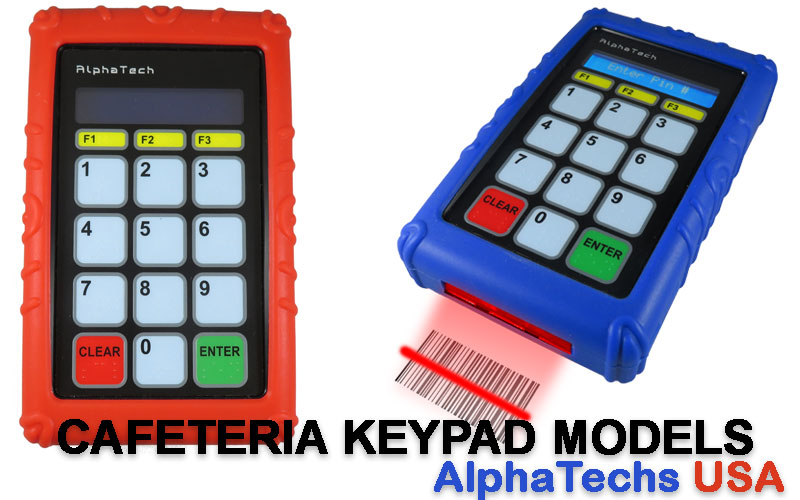
AlphaTechs USA offers a wide selection of innovative solutions designed to improve school lunch experience and make school lunch lines go faster.
Specifically created for US school cafeterias, our pin pads, 1D scanners and 1D/2D QR barcode scanners and RFID code readers are compatible with all school lunch POS systems. Each unit comes with a free complementary anti-shock cover designed to keep your devices safe at all time.
Stand-alone readers are also available including orbital scanners, USB handheld barcode scanners as well as Bluetooth handheld barcode scanners.
Our devices are compatible with all US school cafeteria POS systems.
For any school cafeteria scanner question, feel free to contact us.
References
[1] – https://squareup.com/us/en/online-ordering
[2] – https://omegapos.com/blogs/using-pos-driven-guest-feedback-surveys-to-improve-cafe-service/
[3] – https://dbs4pos.com/pos-system-for-school-cafeteria/
[4] – https://www.volantesystems.com/blog/unifying-food-technology-and-service-the-essential-role-of-cafeteria-pos-in-2026/
[5] – https://nationalitpros.com/reducing-operating-costs-with-self-service-kiosks/
[6] – https://www.fooda.com/blog/cafeteria-pos-systems-comparison
[7] – https://taptouchpos.com/blogs/10-proven-inventory-tips-to-control-food-waste-in-restaurants/
[8] – https://brilliantpos.com/cafeteria-pos/
[9] – https://lavu.com/how-pos-inventory-tools-cut-costs-in-restaurants/
[10] – https://blog.heartlandschoolsolutions.com/4-key-factors-to-a-successful-cafeteria-pos-implementation
[11] – https://www.oracle.com/food-beverage/restaurant-pos-systems/restaurant-inventory-management-software/
[12] – https://getquantic.com/restaurant-pos-system-features/
[13] – https://www.squirrelsystems.com/posts/technology/top-pos-features-for-2026-what-modern-operators-expect-from-a-cloud-first-restaurant-platform/
[14] – https://www.blogicsystems.com/restaurant-pos/menu-management
[15] – https://www.eats365pos.com/us/expansion-module/dynamic-digital-menu
[16] – https://www.onehubpos.com/blog/how-pos-integration-enables-seamless-mobile-ordering-and-payments
[17] – https://arbapro.com/hospital-cafeteria-pos-system-software/
[18] – https://pos.nuvioo.com/payment-processing
[19] – https://harrisschoolsolutions.com/blogposts/cafeteria-pos-do-schools-need-point-of-sale-systems/
[20] – https://www.touchdynamic.com/blogs/news/must-have-features-school-cafeteria-pos
[21] – https://nutrition.edutrak.com/school-lunch-software.html
[22] – https://bepoz.com/blog/hospital-cafeteria-pos-systems-101/
[23] – https://bepoz.com/features-2/point-of-sale-student-meal-plans/
[24] – https://www.infor.com/resources/infor-pos-for-higher-education-food-services
[25] – https://www.skytab.com/blog/pos-system-install-checklist
[26] – https://squareup.com/us/en/the-bottom-line/starting-your-business/total-cost-of-ownership-pos-system
[27] – https://www.trykitchenhub.com/post/hidden-costs-of-cheap-pos-systems-for-restaurants