Barcode scanners can turn a three-week inventory process into just four days at schools.
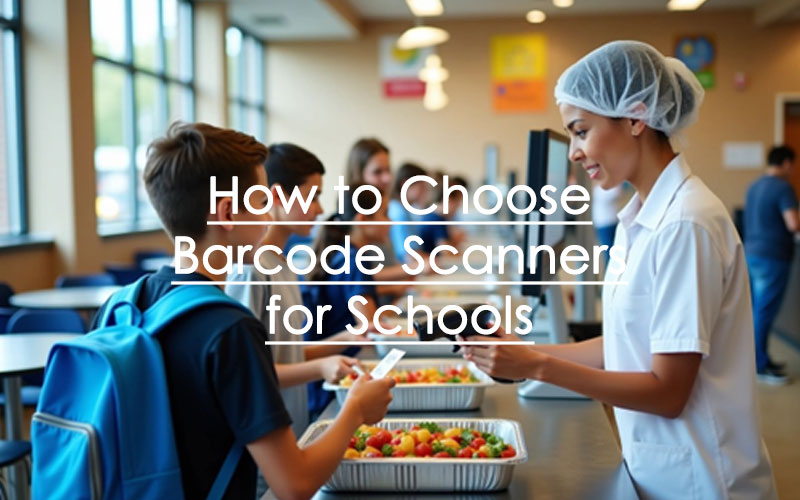
Schools nationwide are finding ways these powerful tools streamline operations – from tracking library books to monitoring attendance. The efficiency becomes most crucial in busy school cafeterias where long lunch lines cut into valuable learning time. A scanner processes students faster than manual Lunch ID entry and ensures more accurate data. QR scanners read barcodes from any angle, which makes K12 school lunch lines move substantially faster.
We cafeteria managers face daily challenges of feeding hundreds of students within tight timeframes. The right id scanner becomes crucial for schools. Modern barcode systems provide an affordable, reliable, and flexible solution that meets various school needs. These systems automate processes and minimize errors common with manual tasks.
This piece covers everything about choosing, setting up, and optimizing barcode scanners for your school cafeteria. We’ll help you make the right choice whether you’re upgrading your current system or implementing scanning technology for the first time.
Understand Cafeteria Needs Before Choosing a Scanner
Schools need to understand their cafeteria’s unique challenges before buying barcode scanners. Getting the right scanner starts with a full picture of your day-to-day needs.
Identify peak lunch hours and student volume
School lunch periods typically last between 20 to 30 minutes. This creates a tight window to feed hundreds of hungry students at once. Students end up with just 7 to 10 minutes to eat after standing in line and moving between classes. Cafeteria managers face a tough question: how can they make every minute count?
Start by tracking your busiest times. The lunch rush creates predictable traffic patterns that need careful planning. You’ll need to know student numbers for each lunch period to staff properly and get the right equipment. This information helps pick scanners that can handle your daily student traffic.
Assess current lunch line bottlenecks
Long lines create problems beyond just delayed lunches – they hurt nutrition, learning, and student satisfaction. Students often skip school lunch because the wait is too long. Look for these common slowdowns in your current setup:
- Spots where staff manually enter IDs
- Time spent handling cash
- Not enough service points during rush hour
- Poor traffic flow between stations
Schools that use barcode scanning see 15-20% more students buying lunch because the lines move faster. This leads to more revenue for school meal programs.
Evaluate existing POS system compatibility
Your point-of-sale system is the backbone of cafeteria operations. Any new scanner must merge naturally with this setup. Today’s school POS systems come with features like student account linking, quick-keys for common items, and work with different input devices.
Think about whether your current POS works with both 1D and 2D scanners and different ID methods. Many schools now use two methods – ID cards and PIN numbers – since one method alone isn’t perfect. Your scanners need to work with your current software to make implementation successful.
Types of Barcode Scanners for School Cafeterias
The right scanner technology can transform your cafeteria’s efficiency. Let’s get into the different types you might see when you upgrade your lunch line systems.
1D vs 2D barcode scanners
These scanners differ in how much data they can hold and how they read information. 1D barcode scanners read linear barcodes horizontally with laser technology and store up to 12 characters. These standard scanners work at shorter ranges, between 4 to 24 inches.
2D barcode scanners are more advanced and can read information both horizontally and vertically. They store up to 7,089 characters – way more than the 12 characters in 1D codes. On top of that, 2D scanners give you:
- The ability to read barcodes from any angle
- Better handling of damaged codes
- They work with both 1D and 2D barcodes
Handheld vs hands-free scanners
Handheld scanners shine in school settings. Your cafeteria staff can use these devices, which come in both corded and cordless versions, to scan student IDs anywhere. Research shows these scanners speed up student check-ins and track meals more accurately.
Hands-free scanners started in retail but work great in cafeterias. Your workers can process items quickly without perfect barcode alignment. This helps during lunch rush when hundreds of students need to move through the line quickly.
QR code scanners and their benefits
Schools now use QR scanners more often, especially since recent health concerns emerged. Paul V. Moore High School uses QR codes for contact tracing – students scan codes on their seats before eating to create digital seating records.
QR codes do more than just improve safety. Students check daily menu items before joining the lunch line by scanning a code. This reduces crowding around menu boards.
Web-based vs hardware-based scanners
Hardware scanners are tough, reliable devices built specifically to read barcodes. These tools work great in busy scanning environments.
Web-based scanners turn smartphone or computer cameras into scanning tools through apps or browsers. They cost less than hardware options and offer more flexibility. Schools with tight budgets often start with these software-based solutions to get into barcode technology.
How to Set Up and Test Your Scanner
Setting up your barcode scanner properly is vital for smooth cafeteria operations. A well-configured scanner will reduce lunch line wait times and improve accountability in your food service program.
Check compatibility with cafeteria software
Make sure your scanner works with your existing POS system. Most school cafeteria scanners work well with popular lunch management software. AlphaScan models are fully programmable and compatible with all US school lunch POS systems. Users of specialized systems like EZ School Lunch should follow the reprogramming instructions in the manual.
Configure scanner for Barcode 39 or QR codes
Most schools use either “Code 39” or “Code 128” barcode formats. Your cafeteria might need a QR scanner that reads both 1D and 2D codes without effort. After unboxing your scanner:
- Read the installation instructions provided with your device
- Connect the scanner to your computer’s USB port
- Log into your cafeteria management system
- Enable barcode scanning functionality in system settings
Test with student ID cards or lunch cards
The scanner’s setup needs verification. Open Notepad on a Windows computer, make it the active application, and scan a student ID. The barcode number should appear in Notepad. You can adjust scanning angle and distance as needed—practice makes perfect.
Ensure carriage return is enabled for auto-submit
Your scanner needs configuration to send an ENTER key after each scan automatically. This vital setting will process each student without staff pressing enter. This feature alone speeds up processing substantially during busy lunch periods.
Best Practices for Smooth Cafeteria Integration
Barcode scanners in schools need careful integration. Their success relies on planning that goes well beyond the original setup.
Train staff on scanner usage
The right training helps cafeteria staff extend scanner life substantially. The core team needs detailed training sessions that cover correct usage, cleaning procedures, and simple troubleshooting steps. Regular refresher courses help everyone stay current with best practices. We focused on correct scanner positioning over barcodes to minimize errors.
Use anti-shock covers for durability
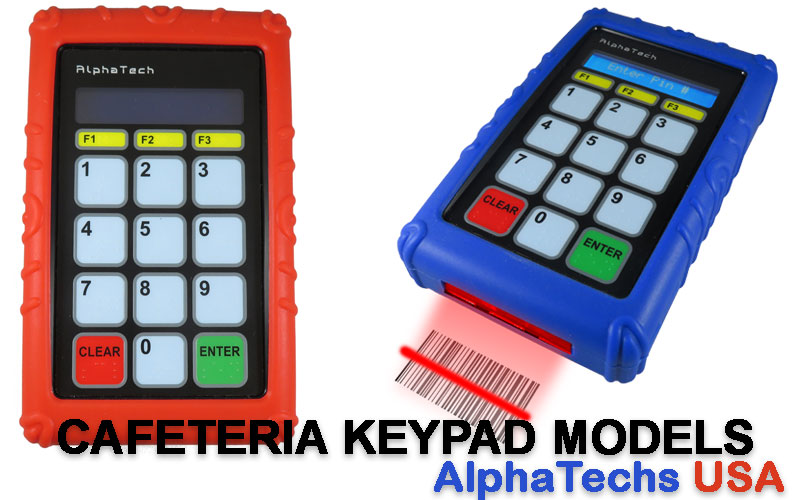
Busy cafeterias need protective accessories. Anti-shock rubber covers shield scanners during rushed lunch periods. These covers come in several colors (black, blue, red) to help distinguish scanners when multiple lines connect to one computer. The protective cases cost extra upfront but save money by preventing damage from drops.
Set up scanning stations for high flow
Scanner placement should optimize efficiency:
- Place scanners at entry points before food selection
- Let students scan their own IDs through self-service
- Pre-ordering systems can reduce serving station bottlenecks
Monitor scan logs for accuracy
A tracking system should monitor each scanner’s performance. The system logs cleaning schedules, service dates, and repair records for every device. Regular data reviews help spot problems with specific scanners or student accounts.
Plan for maintenance and updates
A regular maintenance schedule should include cleaning and professional inspections. The team checks manufacturer websites for firmware updates to keep performance optimal. Scanners need safe, clean storage spaces when idle to avoid moisture, dust, or extreme temperatures.
Conclusion
The right barcode scanners in your school cafeteria can change more than just lunch lines. In this piece, we’ve seen how effective scanning systems substantially cut wait times, boost participation rates, and give students more time to eat their meals.
Your scanning system’s success depends on understanding your cafeteria’s specific needs before buying equipment. Student numbers, current bottlenecks, and POS system compatibility are the foundations of choosing the most appropriate scanner type.
The technology options might seem overwhelming at first. But each option – 1D or 2D scanners, handheld or hands-free models, or QR code systems – brings specific benefits that solve different cafeteria challenges. Success comes from matching these features to your needs.
A proper setup and regular maintenance will keep your investment valuable long after installation. Your staff needs training, protective gear, and regular system checks to optimize scanner life and performance.
Note that barcode scanners do more than speed up lines – they improve students’ entire lunch experience. Students who used to skip meals because of long lines now have time to eat properly. This directly helps their academic performance and overall well-being.
Better cafeteria service starts with a simple scan. This knowledge will help you build a smoother, faster, and more reliable lunch service that helps everyone in your school community.
FAQs
Q1. What factors should I consider when choosing a barcode scanner for my school cafeteria? Consider your cafeteria’s peak hours, student volume, existing bottlenecks, and compatibility with your current POS system. Also, think about whether you need 1D or 2D scanning capabilities and if handheld or hands-free scanners would work best for your setup.
Q2. How do barcode scanners improve school lunch operations? Barcode scanners can significantly reduce wait times, increase student participation in school lunch programs by 15-20%, improve data accuracy, and automate processes. They also allow for faster student processing, giving students more time to eat their meals.
Q3. What’s the difference between 1D and 2D barcode scanners? 1D scanners read linear barcodes horizontally and can store up to 12 characters. 2D scanners can read both horizontally and vertically, storing up to 7,089 characters. 2D scanners also offer better error tolerance and can read from multiple angles.
Q4. How do I set up and test a new barcode scanner in my school cafeteria? First, ensure compatibility with your cafeteria software. Then, configure the scanner for the appropriate barcode type (usually Code 39 or QR). Test it with student ID cards and make sure the carriage return is enabled for auto-submit. Practice scanning at different angles and distances for optimal performance.
Q5. What maintenance practices should be followed for barcode scanners in school cafeterias? Regularly train staff on proper usage and cleaning procedures. Use anti-shock covers for durability. Set up a maintenance routine including cleaning and professional check-ups. Monitor scan logs for accuracy and potential issues. Store scanners in safe, clean environments when not in use, and keep firmware updated.
AlphaTechs USA offers a wide selection of innovative solutions designed to improve school lunch experience and make school lunch lines go faster.
Specifically created for US school cafeterias, our pin pads, 1D scanners and 1D/2D QR barcode scanners and RFID code readers are compatible with all school lunch POS systems. Each unit comes with a free complementary anti-shock cover designed to keep your devices safe at all time.
Stand-alone readers are also available including orbital scanners, USB handheld barcode scanners as well as Bluetooth handheld barcode scanners.
Our devices are compatible with all US school cafeteria POS systems.
For any school cafeteria scanner question, feel free to contact us.