
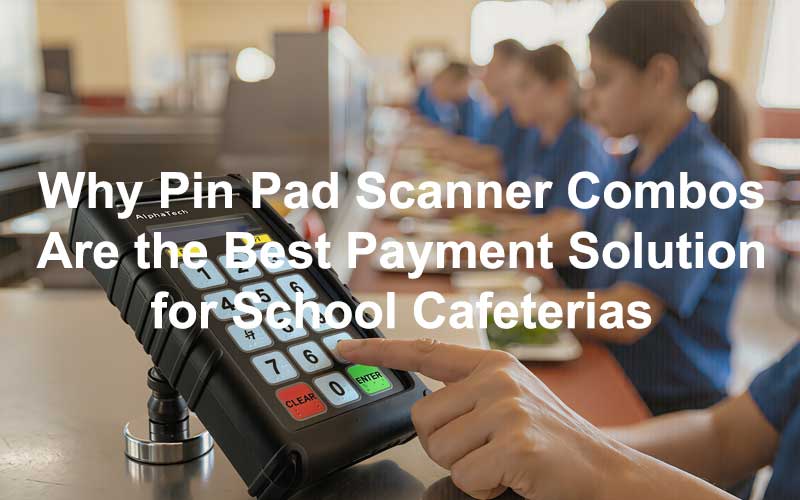
Every lunch period, cafeteria lines slow to a crawl for one predictable reason: a student can’t find their ID card. Multiply that by hundreds of students a day, and even a 15-second delay per forgotten card adds up to lost instructional time, frustrated staff, and stressed-out kids who just want to eat. This is why more K-12 districts are moving away from single-method ID scanners and toward pin pad scanner combo systems — devices that let students either scan a physical ID or type in a personal PIN code to complete their lunch transaction.
Below, we break down why this hybrid approach has become the gold standard for school cafeteria point-of-sale systems, and what to look for when choosing one for your district.
The Problem with Scanner-Only Systems
Barcode and ID-card-only scanners work well in theory, but school cafeterias are not controlled environments. In practice:
Cards get lost, forgotten, or damaged — especially among younger students who don’t yet have the habit of carrying a wallet or lanyard.
Lines back up fast. A single misplaced card can create a domino effect, with cafeteria staff manually looking up student names while a line of hungry kids waits behind them.
Manual lookups introduce human error, increasing the risk of a student being charged to the wrong account or a free/reduced lunch status being mismatched.
A scanner-only system puts the entire transaction at the mercy of a small piece of plastic — one that is easy for a student to lose track of.
Why Pin Pad + Scanner Combos Solve This
A pin pad scanner combo gives cafeteria staff and students a built-in backup. If a student has their ID, they scan it and move on in under two seconds. If they don’t, they simply type in a short numeric PIN or student ID number on the keypad, and the system pulls up their account instantly — no stopping the line, no staff intervention required.
This dual-input design solves the core pain point of school meal service: keeping the line moving no matter what a student shows up with.
Key Benefits for School Cafeterias
1. Zero-Downtime Checkout No card, no problem. Students never have to step out of line or delay service because they forgot their ID. The keypad acts as an always-available fallback.
2. Faster Lunch Lines, More Instructional Time Shorter lines mean students get back to class faster and lunch staff can serve more students per period — critical in schools with tight 20–30 minute lunch windows.
3. Protects Student Privacy Modern combo systems are built to protect free and reduced-price lunch status, since transactions look identical whether a student scans or types in a code. No student is singled out or asked to explain why they don’t have a card.
4. Reduces Staff Burden Cafeteria staff no longer need to manually search rosters or verbally confirm names in front of a line of students. The PIN pad does the lookup instantly.
5. Fewer Lost Cards, Lower Replacement Costs Because a forgotten card no longer stops the checkout process, schools see fewer emergency reissues and less administrative overhead tied to card replacement.
6. Works for All Grade Levels Younger students who are more likely to misplace an ID can be taught a simple 4–6 digit PIN, while older students can use either method interchangeably.
7. Seamless Integration with Existing Nutrition Software Most pin pad scanner combos integrate directly with school nutrition point-of-sale (POS) platforms, syncing in real time with student account balances, meal counts, and reimbursement reporting required for USDA compliance.
What to Look for in a School Cafeteria Pin Pad Scanner System
When evaluating pin pad scanner combos for your district’s food service program, prioritize:
. Dual-input flexibility — barcode/ID card scanning and keypad PIN entry on one device
. Fast processing speed — sub-two-second transaction times to keep lines moving
. POS software compatibility — integration with your existing student nutrition system
. Durable, cafeteria-grade hardware — spill-resistant, easy to sanitize, built for high daily use
. Data security — PIN encryption and compliance with student data privacy regulations
. Simple student onboarding — an intuitive interface young students can use independently
The Bottom Line
Forgotten ID cards are inevitable in any school cafeteria — but slow lunch lines don’t have to be. A pin pad scanner combo gives students two reliable ways to pay: scan their ID or type in their code. For districts looking to speed up service, reduce staff workload, and protect student privacy at the register, the pin pad scanner combo isn’t just a nice-to-have — it’s quickly becoming the standard for modern school cafeteria payment systems.
FAQs
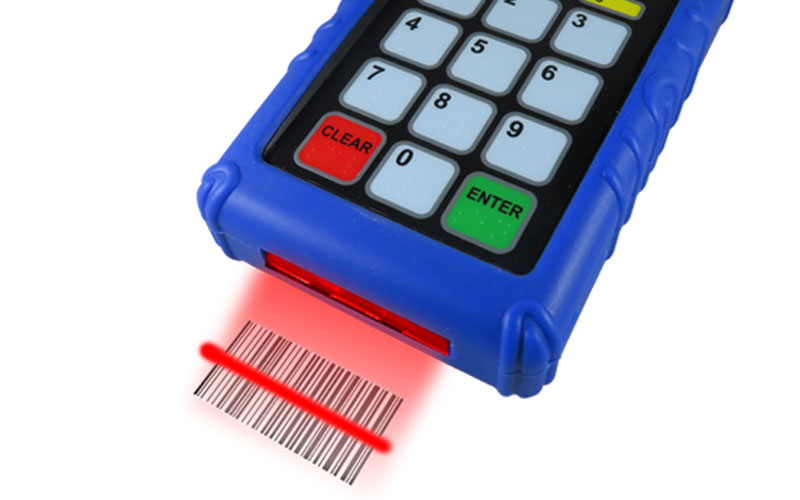
Q1. What is a pin pad scanner combo in a school cafeteria system? It’s a point-of-sale device that combines an ID barcode scanner with a numeric keypad, letting students either scan their ID card or manually type in a PIN or student ID number to pay for their meal.
Q2. What happens if a student forgets their ID card? With a pin pad scanner combo, nothing slows down. The student simply enters their PIN or student ID number on the keypad, and the system pulls up their account just as quickly as a scan would.
Q3. Does using a PIN instead of a scan reveal a student’s free or reduced lunch status? No. Transactions look the same at checkout whether a student scans their card or types in a code, so no student is singled out based on payment method.
Q4. Can younger students use a PIN pad system on their own? Yes. Most systems use short, simple PIN codes (typically 4–6 digits) that even elementary-age students can learn and enter independently, with staff available to assist as needed.
Q5. Will a pin pad scanner combo work with our district’s existing cafeteria software? Most modern combo systems are built to integrate with standard school nutrition POS platforms, syncing account balances, meal counts, and reporting data needed for USDA compliance in real time.
AlphaTechs USA offers a wide selection of Innovative Pin Pad Scanners for School Cafeterias
Looking to upgrade your district’s cafeteria checkout process? A pin pad scanner combo system pays for itself in saved instructional time, reduced card replacement costs, and shorter lunch lines from day one.
Specifically created for US school cafeterias, our pin pad scanner combos AlphaScan 1D, AlphaScan QR Express and AlphaScan RFID are compatible with all school lunch POS systems. Each unit comes with a free complementary anti-shock cover designed to keep your devices safe at all time.
Stand-alone readers are also available including orbital scanners, USB handheld barcode scanners as well as Bluetooth handheld barcode scanners.
For any school cafeteria POS scanner question, feel free to contact us.
References
[1] – https://www.m2sys.com/blog/others/biometric-solutions-for-school-lunch-line-point-of-service/
[2] – https://puredata.zendesk.com/hc/en-us/articles/8490568187540-PowerLunch-and-Barcode-Scanner
[3] – https://www.alphatechsusa.com/school-cafeterias-adopt-id-scanners/
[4] – https://schoolnutrition.org/journal/fall-2017-use-of-point-of-service-systems-in-school-nutrition-programs-types-challenges-and-employee-training/
[5] – https://alphatechsusa.com/school-lunch-technology-guide/
[6] – https://support.uscsd.k12.pa.us/kb/article/390-student-id-barcode-scanning-using-the-focus-pennsylvania-app/
[7] – https://nutrition.fultonschools.org/BarCode
[8] – https://harrisschoolsolutions.com/harris-school-solutions-partners-with-identimetrics-for-increased-security-and-accuracy/
[9] – https://www.genovation.com/faster-cafeteria-lines-with-student-id-pin-pads-and-barcode-scanners/
[10] – https://www.ezschoolapps.com/blog/school-lunch-app-software-solutions-2026/
[11] – https://www.accusoft.com/resources/blog/the-barcode-benefit-in-education/
[12] – https://www.finaleinventory.com/guides/common-barcode-problems-fixes/
[13] – https://www.scandit.com/resources/guides/barcode-scanning-challenges/
[14] – https://www.govtech.com/education/k-12/Connecticut-High-School-Scans-Kids-Through-Lunch-Line.html